
Turn on Data Validation
To create a dropdown menu in Excel:
- Select one of the cells in your worksheet (for example, A1).
- Open the Data tab.
- Then click Data validation.

Choosing validation criteria
In the dialog box that opens, you have a dropdown menu with many options.

For instance:
- Select the Whole number option.
- Then, fill in a range of values between the Min and Max fields.
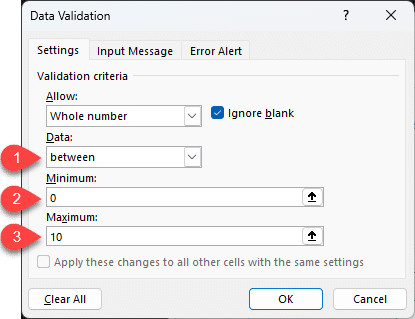
- Press OK.
- Go back to cell A1.
- If you don't enter a whole number between 0 and 10, you will see the following message (here, the value entered isn't a whole number).

The error message can be customized from the Error Alert tab in the data validation dialog box.

This last option is useful because you can display informative messages without blocking input.

How to create a dropdown menu
As you can see, the Data validation menu controls what can be entered in a cell. A dropdown menu is based on the same principle: offering a limited choice of values.
- Open the Data > Data validation dialog box.
- Select the List option.
- Then go to the Source text box.

There, you have two options:
- You can type the values directly, separated by commas.

- Or specify the data range that contains the values for the dropdown menu.

The result in your spreadsheet
Whatever method you choose (manual entry or a data range), the result is the same. The cell where you applied data validation displays a dropdown menu with the expected values listed:
- Display Yes / No

- And for the data range

The dropdown menu doesn't contain duplicates. This feature is exclusive to Excel 365.
How to delete a dropdown menu?
To delete a dropdown menu:
- Select the cell with the dropdown menu.
- Open the Data > Data validation dialog box.
- Click the Clear All button.

Finding a dropdown menu
The problem with cells that contain a dropdown menu is that the arrow only appears when the cell is active.

To find them, go to the menu:
- Home
- Edit
- Find & Select
- Data Validation

Excel then moves to the cell or cells containing the dropdown menus.

Continue learning
Keep building your Excel skills with the rest of this tutorial series:
- Tutorial - Excel keywords
- Tutorial - Adjusting the Size of rows and columns
- Tutorial - How to make calculations in Excel
- Tricks to Insert, Delete, Hide Rows and Columns
- Tutorial - All Excel tricks to Copy-Paste
- Tutorial - Moving cells or columns with the mouse
- Tutorial - The Numbers Format
- Tutorial - Excel Alignment text tips
- Learn the secrets of Sorting Data with Excel
- Excel Tutorial - Filtering your data
- Manipulate Text in Excel without formula
- Learn how to use the SUM function in Excel
- Tutorial for the Excel Functions AVERAGE, MIN, and MAX
- Learn how to use the Dollars in an Excel formula