SUMIF and SUMIFS both add up values that meet a condition. Their names differ by one letter, but their arguments are not written in the same order. To understand why, let’s start with SUMIF.
SUMIF: the column to add comes last
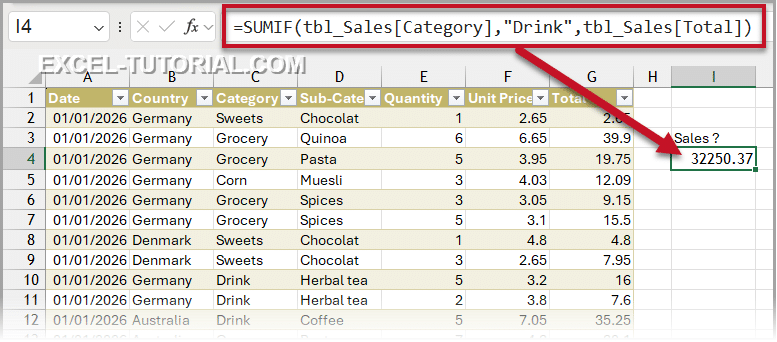
SUMIF needs three arguments, always in this order: the column where you look for the condition, the condition, and the column to add, in last position. To add up the sales of the Drink category:
=SUMIF(tbl_Sales[Category],”Drink”,tbl_Sales[Total])
Swap the two columns: no error, but no result
Now, let’s swap the column to test and the column to add:
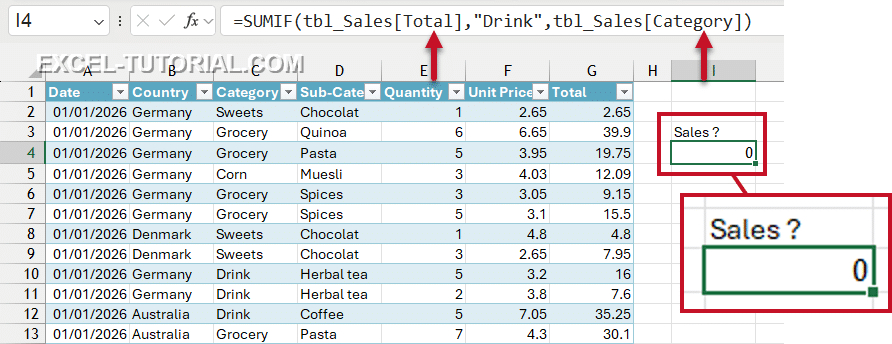
=SUMIF(tbl_Sales[Total],”Drink”,tbl_Sales[Category])
Excel accepts the formula without any error message, but it returns 0, and it’s correct!
Excel looked for the word “Drink” in the Total column, found only numbers, and added nothing. On a report with dozens of totals, this kind of zero goes unnoticed very easily.
💡 So keep this order in mind: with SUMIF, the column to add is at the end. This is exactly what changes with SUMIFS.
SUMIFS: the column to add comes first
With SUMIFS, the column to add moves to the first position. Then come the pairs “column to test, condition”. Here is the same calculation as above:
=SUMIFS(tbl_Sales[Total],tbl_Sales[Category],”Drink”)
- SUMIF: the column to test, the condition, then the column to add (3rd and last argument).
- SUMIFS: the column to add first, then the pairs “column to test, condition”.
Try it right now
Write your own SUMIF formulas on a sales table: totals by salesperson, by region and by product, in 6 steps, free and corrected as you type:
A bit of history: why the order changed
SUMIF is one of Excel’s oldest functions. It was designed for a single condition, so the column to add could sit quietly at the end, and it is even optional.
SUMIFS only appeared in Excel 2007, together with COUNTIFS and AVERAGEIFS. It accepts up to 127 conditions, so Excel can’t know where the list of arguments ends. The only fixed place left for the column to add was the first one.
Microsoft could not change SUMIF without breaking millions of existing workbooks. So both syntaxes live side by side, and the same inversion exists between AVERAGEIF and AVERAGEIFS.
The habit that avoids the error
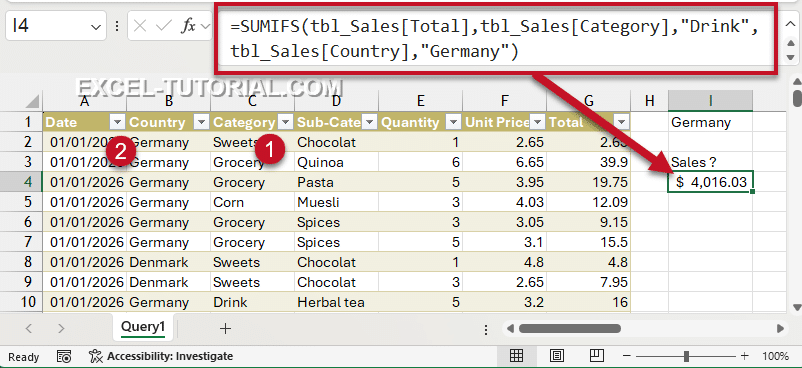
💡 Always use SUMIFS, even with a single condition. You only have one syntax to remember, the same as COUNTIFS and AVERAGEIFS. And when you need a second condition, just add a pair at the end:
=SUMIFS(tbl_Sales[Total],tbl_Sales[Category],”Drink”,tbl_Sales[Country],”Germany”)