What Is the Difference Between an AI Prompt and an AI Agent

Last Updated on 15/05/2026
Reading time: 2 minutes

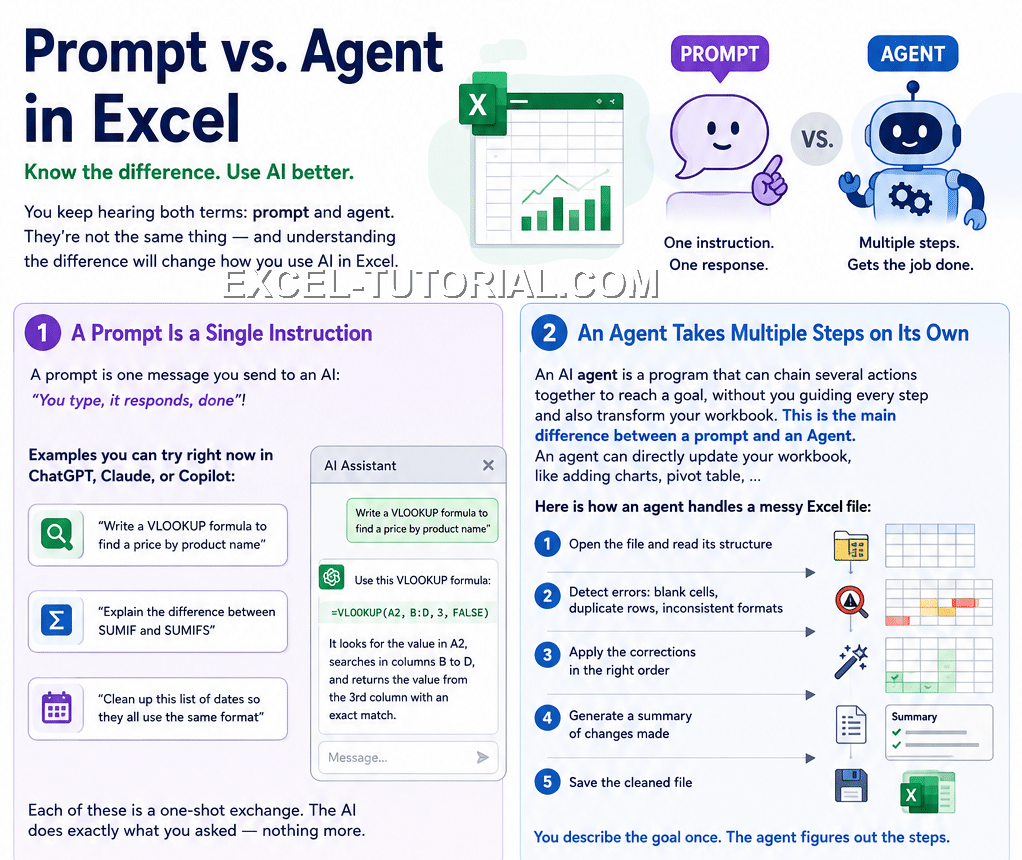
You keep hearing both terms: prompt and agent. They're not the same thing — and understanding the difference will change how you use AI in Excel.

A Prompt Is a Single Instruction

A prompt is one message you send to an AI: "You type, it responds, done"!

Examples you can try right now in ChatGPT, Claude, or Copilot:

  • "Write a VLOOKUP formula to find a price by product name"
  • "Explain the difference between SUMIF and SUMIFS"
  • "Clean up this list of dates so they all use the same format"

Each of these is a one-shot exchange. The AI does exactly what you asked — nothing more.

An Agent Takes Multiple Steps on Its Own

An AI agent is a program that can chain several actions together to reach a goal, without you guiding every step and also transform your workbook. This is the main difference between a prompt and an Agent. An agent can directly update your workbook, like adding charts, pivot tables, ...

Here is how an agent handles a messy Excel file:

  1. Open the file and read its structure
  2. Detect errors: blank cells, duplicate rows, inconsistent formats
  3. Apply the corrections in the right order
  4. Generate a summary of changes made
  5. Save the cleaned file

You describe the goal once. The agent figures out the steps.
Prompt vs Agent in Excel

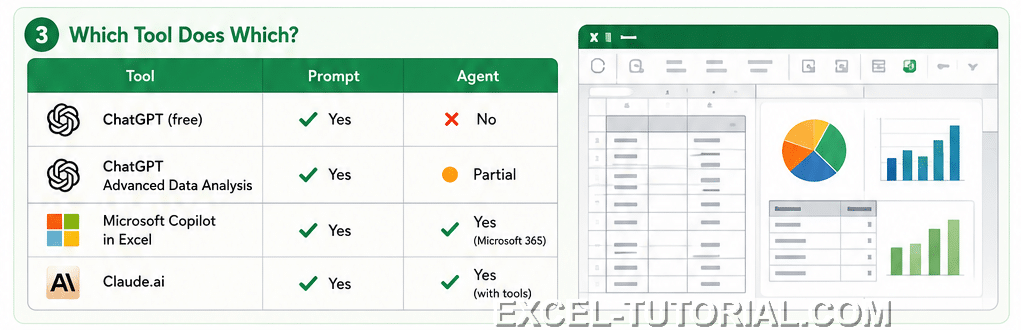
Which Tool Does Which?

ToolPromptAgent
ChatGPT (free)YesNo
ChatGPT Advanced Data AnalysisYesPartial
Microsoft Copilot in ExcelYesYes (Microsoft 365)
Claude.aiYesYes (with tools)
Which tool has an agent

When to Use Each

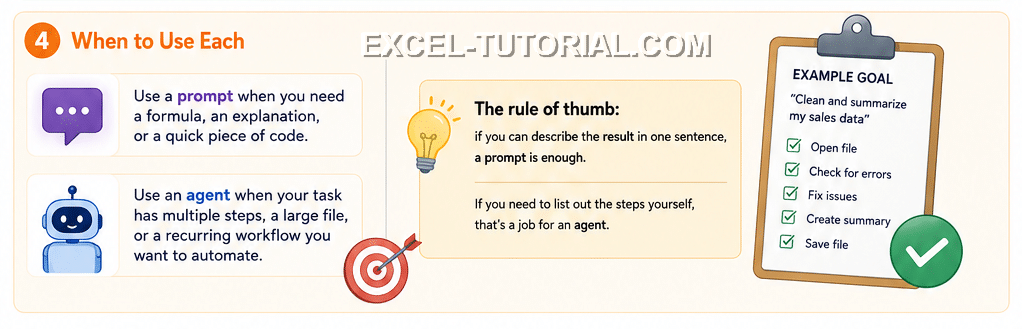
  • Use a prompt when you need a formula, an explanation, or a quick piece of code.
  • Use an agent when your task has multiple steps, a large file, or a recurring workflow you want to automate.

The rule of thumb: if you can describe the result in one sentence, a prompt is enough. If you need to list out the steps yourself, that's a job for an agent.
When to use a prompt or agent

Leave a Reply

Your email address will not be published. Required fields are marked *

What Is the Difference Between an AI Prompt and an AI Agent

Reading time: 2 minutes
Last Updated on 15/05/2026

You keep hearing both terms: prompt and agent. They're not the same thing — and understanding the difference will change how you use AI in Excel.

A Prompt Is a Single Instruction

A prompt is one message you send to an AI: "You type, it responds, done"!

Examples you can try right now in ChatGPT, Claude, or Copilot:

  • "Write a VLOOKUP formula to find a price by product name"
  • "Explain the difference between SUMIF and SUMIFS"
  • "Clean up this list of dates so they all use the same format"

Each of these is a one-shot exchange. The AI does exactly what you asked — nothing more.

An Agent Takes Multiple Steps on Its Own

An AI agent is a program that can chain several actions together to reach a goal, without you guiding every step and also transform your workbook. This is the main difference between a prompt and an Agent. An agent can directly update your workbook, like adding charts, pivot tables, ...

Here is how an agent handles a messy Excel file:

  1. Open the file and read its structure
  2. Detect errors: blank cells, duplicate rows, inconsistent formats
  3. Apply the corrections in the right order
  4. Generate a summary of changes made
  5. Save the cleaned file

You describe the goal once. The agent figures out the steps.

Prompt vs Agent in Excel

Which Tool Does Which?

ToolPromptAgent
ChatGPT (free)YesNo
ChatGPT Advanced Data AnalysisYesPartial
Microsoft Copilot in ExcelYesYes (Microsoft 365)
Claude.aiYesYes (with tools)
Which tool has an agent

When to Use Each

  • Use a prompt when you need a formula, an explanation, or a quick piece of code.
  • Use an agent when your task has multiple steps, a large file, or a recurring workflow you want to automate.

The rule of thumb: if you can describe the result in one sentence, a prompt is enough. If you need to list out the steps yourself, that's a job for an agent.

When to use a prompt or agent

Leave a Reply

Your email address will not be published. Required fields are marked *